
7 Best LinkedIn Outreach Tools for Small Agencies
Read Now 7 Best LinkedIn Outreach Tools for Small Agencies The LinkedIn Red Screen of Death You log in to check your leads, but the
Enjoy Lifetime Access to Hour Tag for Just $39!
You bought a Mac because you value efficiency, design, and a seamless workflow. Yet, your daily routine involves manually clicking through LinkedIn profiles, copy-pasting the same three messages, and praying for a reply. It’s the opposite of the high-leverage work you should be doing as a founder or agency owner.
Most LinkedIn automation tools promise a way out, but they carry a hidden cost. For Mac users, the choice usually boils down to risky cloud servers or clunky software that doesn’t feel native to the ecosystem.
The biggest fear isn’t the work itself—it’s the red warning from LinkedIn. One wrong move with a detected bot and your primary source of B2B clients vanishes. You need a system that feels like it belongs on your Mac: fast, reliable, and, above all, safe.
The “Old Guard” of automation relies almost exclusively on cloud-based servers. These tools log into your account from a data center IP address that looks nothing like your actual location. LinkedIn’s 2026 detection algorithms are designed specifically to catch these geographic mismatches.
If you log in from your MacBook in San Francisco while your automation tool “logs in” from a server in Virginia, you’ve just tripped a silent alarm. It’s a matter of when, not if, your account gets restricted.
Beyond safety, most tools are “dumb.” They follow a static list you scraped weeks ago. By the time the tool reaches the bottom of the list, the leads are cold, or the data is outdated. You end up paying for a tool that creates more admin work than it solves.
XXX
The most successful agencies in 2026 have shifted to a Local-First framework. Instead of delegating your LinkedIn profile to a distant server, you keep the automation on your own machine.
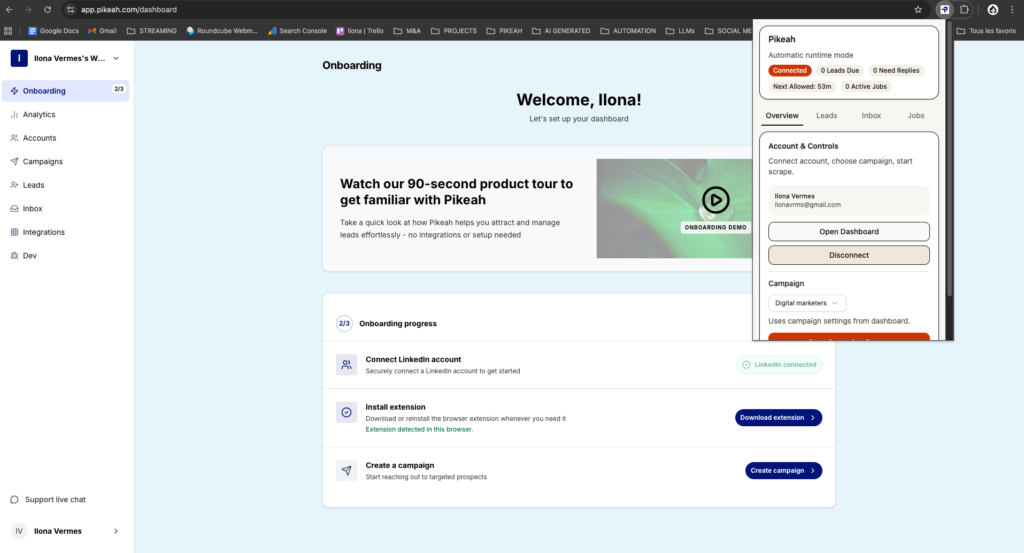
This approach uses a Chrome Extension to perform actions directly within your browser. Because it uses your actual IP address and hardware ID, it is virtually indistinguishable from a human user.
The goal is to build an Evergreen Lead Loop. This means your outreach shouldn’t be a one-time event. It should be a continuous cycle where your search filters stay active, and the tool injects fresh prospects into your sequences as soon as they appear on LinkedIn.
To build a sustainable lead machine, you need a stack that prioritizes account longevity over raw volume.
Cloud tools are easy for LinkedIn to block because they originate from known data center IP ranges. A local-first tool like Pikeah runs on your MacBook’s connection. This means every “Connect” or “Message” action looks like you just clicked the button yourself. It respects the same browsing patterns and daily limits a real person would.
Don’t waste time exporting CSV files.
Writing a four-step follow-up sequence is a creative drain. Use an AI Campaign Generator to bridge the gap.
Most LinkedIn automation tools for Mac users create a data nightmare. They push every single contact to your CRM, filling your pipeline with people who haven’t even replied. A “Smart Sync” approach only pushes data to HubSpot or Salesforce after a prospect responds. This keeps your sales pipeline 100% actionable and saves you hours of manual cleanup.

XXX
If you are using the right local-first strategy, you should see consistent, safe growth. Here are the benchmarks our top-performing agency users aim for:
Success isn’t about sending 500 messages a day. It’s about sending 40 highly targeted messages that actually get read because they come from a profile that hasn’t been flagged as a bot.
Your Mac is capable of being your most productive sales rep. By choosing a local-first approach, you get the benefits of automation without the constant fear of losing your account. Focus on the strategy and the conversations; let the software handle the repetitive clicks.
Stop the manual grind and start building your automated pipeline where it’s safest—right in your own browser.
Read Now 7 Best LinkedIn Outreach Tools for Small Agencies The LinkedIn Red Screen of Death You log in to check your leads, but the
Read Now 5 Best Lead Sourcing Tools with Direct HubSpot Sync (2026) Your HubSpot is a Graveyard of Cold Leads You open your CRM to
Read Now Best B2B Tech Stack for LinkedIn Prospecting on a Budget Your Growth is Stuck Behind a Paywall You know you need a better