
Scaling Acceptance Rates with Dynamic Personalization
Read Now Scaling Acceptance Rates with Dynamic Personalization Most LinkedIn connection requests get ignored. Not because your offer is bad. Not because your profile needs
Enjoy Lifetime Access to Hour Tag for Just $39!
Most LinkedIn connection requests get ignored.
Not because your offer is bad. Not because your profile needs a new headshot. They get ignored because the message reads like it was sent to a thousand people at once, because it was.
The average LinkedIn connection acceptance rate hovers around 20–30%. Top performers consistently hit 50–70%. The gap isn’t luck, targeting, or even timing. It’s personalization, specifically, the kind that scales.
This article breaks down exactly how dynamic personalization works, why it moves the needle on acceptance rates, and how to implement it across hundreds of outreach sequences without burning hours doing it manually.
Think about the last cold connection request you received on LinkedIn. If you remember it at all, it probably said something like:
“Hi [First Name], I came across your profile and thought it’d be great to connect!”
You didn’t accept it. Nobody does.
Here’s the problem: LinkedIn users have developed a sharp filter for templated outreach. The moment a message feels copy-pasted, it triggers a mental “spam” label and your request gets archived or ignored, even if what you’re selling is genuinely relevant.
The algorithm doesn’t help either. LinkedIn monitors connection request behavior. High ignore and “I don’t know this person” rates can throttle your ability to send invitations altogether. So every ignored request is a double penalty: a missed lead and a hit to your account health.
Personalization is no longer a nice-to-have. It’s the baseline for getting through.
Personalization on LinkedIn gets misunderstood. Most people think it means adding a first name to the opening line. That’s not personalization, that’s mail merge.
Dynamic personalization means crafting a message that feels written specifically for this person, based on real contextual signals and automating the insertion of those signals at scale.
These signals can include:
When these variables are pulled dynamically and inserted into your outreach templates, the message reads like it was written individually, even if it was generated automatically.
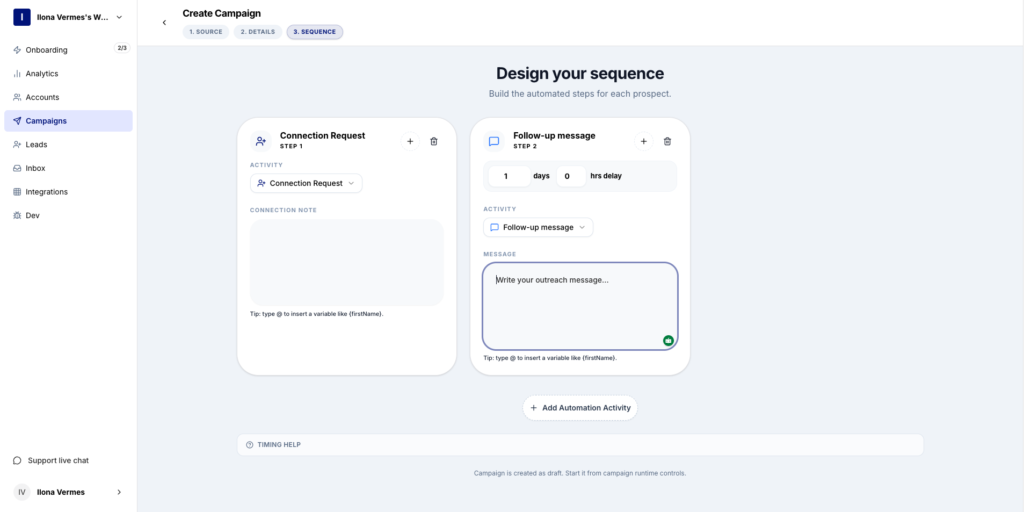
Pikeah’s message editor lets you insert dynamic variables like {{first_name}} and {{company}} directly into your templates — so every message feels written individually, even at scale.
In a tool like Pikeah, dynamic personalization works through custom variables embedded in your message templates. When you build a sequence, you define placeholders — {{first_name}}, {{company}}, {{job_title}}, {{custom_note}} — and the system populates them for each lead when the message is sent.
Here’s a simple example of the difference this makes:
Without dynamic variables:
“Hi Sarah, I help B2B teams generate leads on LinkedIn. Would love to connect!”
With dynamic variables:
“Hi Sarah, I noticed you recently moved into a Head of Growth role at Hyteno, congrats on the step up. I work with growth teams in SaaS on LinkedIn outreach. Would love to connect.”
Both messages are automated. Only one feels human.
The second message works because it acknowledges something real about Sarah’s situation. It signals that you did your homework, even if Pikeah pulled that data from her profile automatically.
The data is consistent across campaigns: adding even one meaningful personalization variable to a connection request can lift acceptance rates by 20 to 40 percentage points compared to a generic template.
Why ? Because a personalized message does three things simultaneously :
The compounding effect matters too. If your acceptance rate goes from 25% to 50%, you don’t just get twice as many connections, you get twice as many starting points for follow-up sequences, twice the audience for your content, and twice the pipeline potential from the same daily outreach volume.
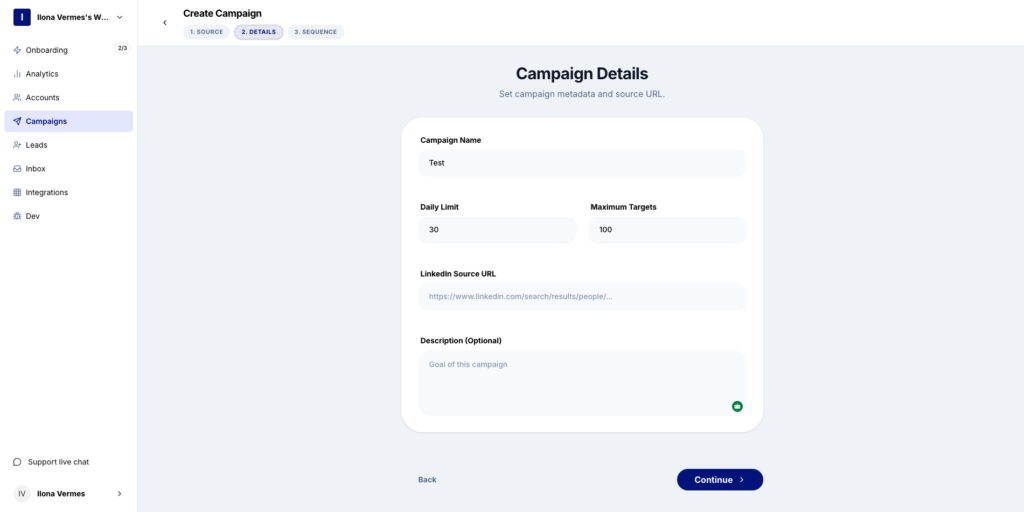
Setting up a new campaign in Pikeah takes under a minute — choose your lead source, configure your sequence, and let the automation handle the rest.
Here’s where most automation tools fail: they let you personalize at scale, but they don’t protect your account in the process.
LinkedIn’s anti-automation systems are increasingly sophisticated. Sending 200 connection requests in a day, all at the same cadence with similar message structures, is a fast path to account restriction, even if every message is perfectly personalized.
Pikeah approaches this differently. The extension runs locally in your browser, using your real IP address rather than a remote server. It mimics natural human behavior: randomized delays between actions, automatic pausing when your pending request queue gets too high, and daily limits that respect LinkedIn’s thresholds.
This means your personalized sequences go out in a pattern that looks organic, because it essentially is. You get the reach of automation without the risk profile of a cloud bot.
If you’re starting from scratch, here’s a practical framework for integrating dynamic personalization into your LinkedIn outreach:
Step 1 — Segment your lead list before you build templates. Different segments need different variables. A list of CTOs at Series A startups needs different messaging than a list of freelance consultants. Don’t try to serve both with the same template.
Step 2 — Identify your highest-signal variables. For most B2B use cases, job title, company name, and a recent trigger event (job change, post, funding round) are the three most impactful. Start there before adding complexity.
Step 3 — Write around the variable, not just with it. The variable should justify the outreach, not just decorate it. “I noticed you’re at {{company}}” is weak. “I work with teams at companies like {{company}} to solve exactly this problem” is stronger.
Step 4 — A/B test your templates. Pikeah’s campaign analytics let you track acceptance rates by sequence. Run two versions of the same message — one with a standard opener, one with a contextual trigger — and let the data guide iteration.
Step 5 — Automate follow-ups, not just connection requests. The connection is the door. Once someone accepts, your follow-up sequence is where the conversation begins. Dynamic personalization should carry through every message in the sequence, not just the first one.
Scaling acceptance rates on LinkedIn isn’t about sending more requests. It’s about sending better ones, messages that feel like they were written for the person reading them, even when they were generated automatically.
Dynamic personalization bridges that gap. And when it’s paired with safe, browser-based automation that protects your account, you get something most LinkedIn prospectors never achieve: a lead engine that compounds over time without the manual grind.
If you haven’t yet tested what even one or two dynamic variables can do for your acceptance rate, that’s the first experiment worth running this week.
Read Now Scaling Acceptance Rates with Dynamic Personalization Most LinkedIn connection requests get ignored. Not because your offer is bad. Not because your profile needs

Read Now Building a Predictable LinkedIn Lead Engine Most LinkedIn outreach looks like this: you spend a few motivated hours sending connection requests, a reply

Read Now Why Browser-Based Tools Outperform Cloud Automation If you’ve ever had a LinkedIn account restricted, warned, or outright banned while using an automation tool,