Enjoy Lifetime Access to Hour Tag for Just $39!

LinkedIn Account Safety & IP Addresses: The 2026 Guide

LinkedIn Account Safety & IP Addresses: The 2026 Guide

Your LinkedIn Account is One “IP Mismatch” Away From a Ban

You log in from your home office in London. Simultaneously, your cloud-based automation tool “logs in” from a server in Virginia to send connection requests. To LinkedIn’s security AI, you have just traveled across the Atlantic in zero seconds.

This is the fastest way to get your account restricted. For solopreneurs and boutique agency owners, your LinkedIn profile is your digital headquarters. Losing it means your sales pipeline vanishes overnight.

If you are serious about account safety, you have to stop thinking about “how many” messages you send and start thinking about where they are being sent from. In 2026, your ip addresses are the primary signal LinkedIn uses to distinguish a human from a bot.

Why the Current Approach to Automation Fails

Most LinkedIn tools on the market are “cloud-based.” They promise convenience because they run 24/7 on remote servers. However, this architecture is fundamentally flawed for long-term growth.

Cloud tools use data center ip addresses. These are easily identified by LinkedIn as non-residential. When thousands of bots share the same server IP, LinkedIn flags the entire range. If your account is tied to that range, you are guilty by association.

Furthermore, cloud tools cannot replicate your unique digital fingerprint. They use “headless” browsers that don’t load assets or execute scripts like a real Chrome or Safari window. This creates a behavioral gap that the 2026 algorithm detects in seconds.

extension Pikeah

XXX

The Framework: Local-First Execution

The only way to guarantee account safety while automating is to stay local. This means the software executes actions directly within your own browser, on your own computer.

By staying local, you ensure the ip addresses used for automation are identical to the ones you use for manual browsing. There is no geographic jump. There is no “data center” red flag.

The goal is to build an Evergreen Lead Loop. You want a system that finds and engages prospects from your own IP, mimicking human rhythms—scrolling, clicking, and pausing—at a pace that looks like a productive human, not a high-speed script.

How it Works in Practice

Maintaining a safe, automated outreach machine requires a shift in technical strategy. Here is how to implement a local-first system.

1. Browser-Based Execution

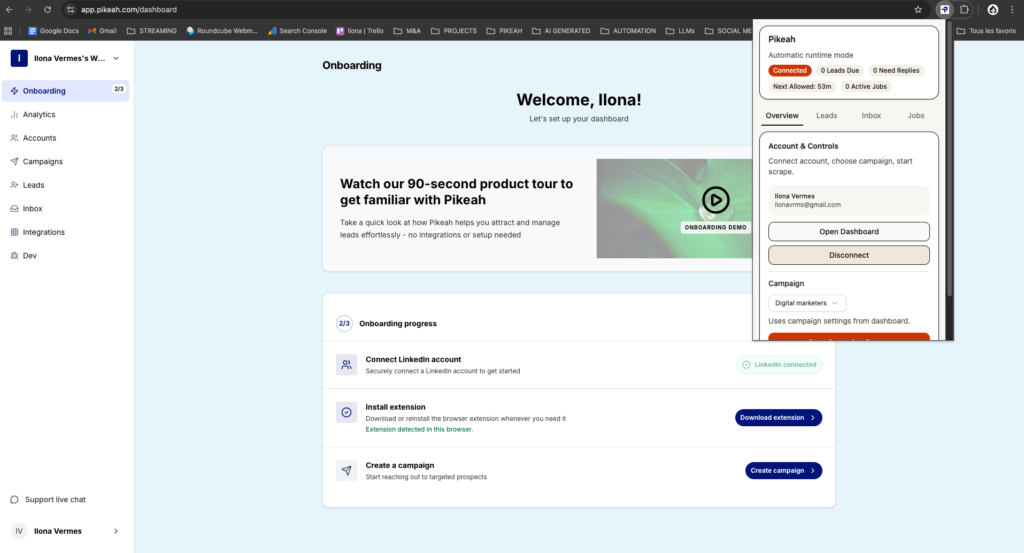
A local-first tool like Pikeah runs as a Chrome Extension. Because it lives inside your browser, it uses your actual hardware ID and residential IP.

  • Zero Geographic Conflict: Your outreach happens from the same city you are currently in.
  • Native Environment: The tool works within the actual LinkedIn web interface, not a simulated environment.
  • Humanized Delays: It randomizes the time between invites, endorsements, and messages to avoid rhythmic patterns.

2. Establishing the Evergreen Lead Loop

Manual data entry is a safety risk because it often leads to bursts of erratic behavior.

  • Paste a LinkedIn or Sales Navigator search URL once.
  • The system monitors this URL and automatically find fresh leads every week.
  • These leads are dripped into your campaigns at a steady, human pace.
  • This avoids the “spike and dip” activity patterns that trigger security audits.

3. AI Campaign Generation for Quality

Relevance is a safety feature. If you send generic spam, people hit the “I don’t know this person” button. If that happens too often, LinkedIn restricts you regardless of your IP.

  • Use an AI Campaign Generator to draft your sequences.
  • Describe your offer in one sentence, and let the AI build a multi-step flow.
  • High acceptance rates tell LinkedIn that you are a “Trusted Member,” which naturally expands your daily limits.

4. Smart CRM Sync for Hygiene

Scaling safely means working less, not more.

  • Connect your HubSpot or Salesforce to your outreach tool.
  • Set the tool to Smart CRM Sync—meaning it only pushes data after a lead replies.
  • This keeps your CRM clean and ensures your sales focus remains on high-intent conversations.
compte LinkedIn

XXX

What Good Results Look Like (Benchmarks)

When you prioritize account safety and use consistent ip addresses, your metrics will reflect a healthy, trusted profile:

  • Acceptance Rate: 30% – 45% (High relevance + Humanized delivery).
  • Account Status: 100% uptime with zero CAPTCHA challenges or warnings.
  • Social Selling Index (SSI): A steady increase in your “Relationship Building” score.
  • Daily Output: 30-50 connection requests per day (on Premium/Sales Navigator).

If you are traveling, simply run the tool from your laptop as usual. The IP will change with your location, which is exactly what a traveling human would do.

Common Mistakes to Avoid

  • Using VPNs for Automation: Most VPN IPs are already blacklisted by LinkedIn. Using a VPN while automating is a major red flag.
  • Simultaneous Logins: Never have a cloud tool and a local tool running at the same time. This creates “dual presence,” which is an immediate ban trigger.
  • Inconsistent Time Zones: If you are in London, don’t set your tool to send messages during New York business hours while you are supposed to be asleep.
  • Ignoring Pending Invites: Having 1,000 unaccepted invites is a signal of poor quality. Withdraw any request that hasn’t been accepted in 14 days to keep your “Reputation Score” high.

Protect Your Profile, Scale Your Agency

Your LinkedIn account is too valuable to treat as a disposable asset. By moving away from cloud bots and embracing a local-first strategy, you align yourself with how the platform expects a real person to behave.

Scale your outreach, find your ideal B2B clients, and keep your account safety at the forefront by staying on your own ip addresses. The safest way to grow is the human way.

Want safe, scalable lead generation that works 24/7 ?

Start today

MOST POPULAR

Share this post